


If you need a new domestic gas connection, Sui Northern Gas Pipelines Limited (SNGPL) provides an official online application form so you can apply from home. This guide explains every field on the form at https://www.sngpl.com.pk/onlineapp/pages/form.jsp and gives practical tips and a checklist so your application is accepted the first time. Use this guide alongside screenshots of the form to make filling it painless.
What you need before you start?
Make sure you have these items ready before you open the online form. They speed up the process and reduce mistakes:
- Your CNIC (front and back) — clear scanned images or photos.
- Proof of ownership / property documents (sale deed, registry, allotment letter, transfer, or lease with NOC if tenant). If multiple pages, combine into one PDF.
- Clear photos of the property (optional but helpful) — show main entrance and street frontage.
- Active mobile number and email — SNGPL will contact you using these.
- Know the nearest consumer number (if you have it) or note a nearby landmark.
- Scan or photograph documents so total upload size stays under 15 MB (SNGPL limit noted on the form).
Only apply for premises that already fall on SNGPL’s gas network. If the pipeline does not exist in front of the property, the application may be cancelled or rejected during survey. The form explicitly warns applicants to ensure the site is on the SNGPL network.
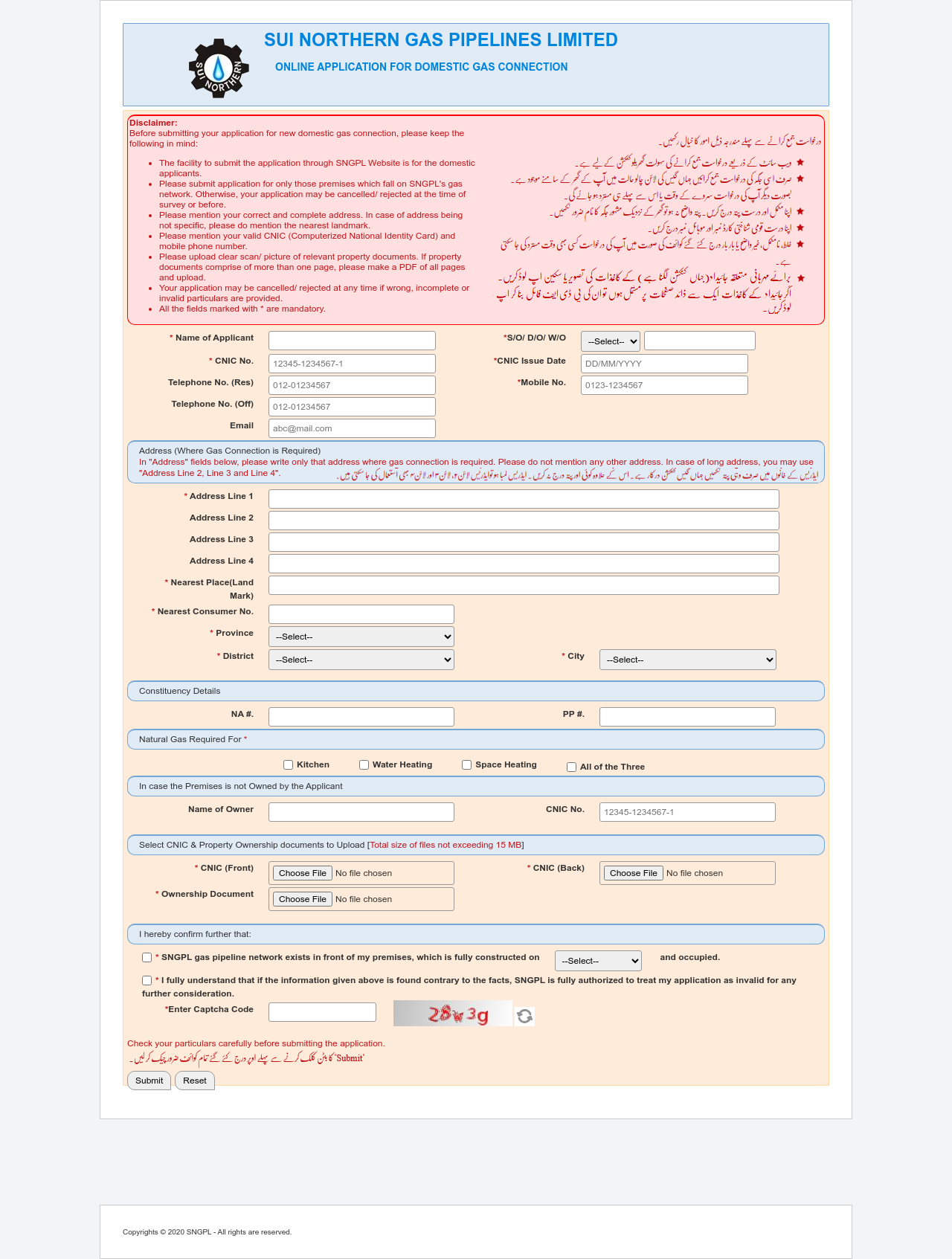
Field-by-field walkthrough (and what to enter)
When you open the online form, you’ll see several sections. Below I explain what to type in each field and common pitfalls.
1. Name of Applicant & Relation (S/O, D/O, W/O)
- What to enter: Your full name exactly as it appears on your CNIC.
- Relation prefix: Select S/O (son of), D/O (daughter of), or W/O (wife of) depending on the applicant’s relation to the father/husband as printed on CNIC.
- Tip: Don’t use nicknames or abbreviations; mismatch with CNIC causes verification delays.
2. CNIC No. and CNIC Issue Date
- What to enter: Exact CNIC number and issue date as printed on the card. Use the full 13-digit number.
- Tip: If the form rejects formatting, try with or without dashes. Keep the issue date in the format requested by the form.
3. Telephone (Res), Mobile No. (required), Telephone (Off) and Email
- What to enter: A working mobile number that you check daily. If possible, use the number registered with your bank for easier verification.
- Tip: SNGPL may send SMS or call for survey scheduling; avoid temporary numbers.
4. Address (Where Gas Connection is Required)
The form has Address Line 1–4. The form emphasizes: write only the address where the gas connection is required; do not mention any other address. SNGPL
- Address Line 1: House/Apartment number and street.
- Address Line 2: Colony/Phase or block.
- Address Line 3: Sector/estate or building name.
- Address Line 4: Any further details — gate number, floor number, etc.
- Nearest Place (Landmark): Name a landmark everyone will recognize (e.g., “near XYZ mosque / opposite ABC School”). This helps the surveyor locate the property.
- Tip: Be as specific as possible. Vague addresses delay survey or cause cancellation.
5. Nearest Consumer No.
- What to enter: If you know a neighbour’s consumer number (from a nearby meter/bill), put it here. It helps SNGPL confirm the network. If unknown, ask the nearest household or leave blank if the field allows (but filling it speeds processing).
6. Province / District / City (Dropdowns)
- What to enter: Choose the correct province, then district and city from the dropdowns. These must match the address you typed.
- Tip: Selecting wrong district/city will delay verification.
7. Constituency Details (NA #, PP #)
- What to enter: Your voting constituency numbers for National Assembly (NA) and Provincial Assembly (PP)
8. Natural Gas Required For
- Options: Kitchen / Water Heating / Space Heating / All of the Three.
- What to enter: Tick boxes that match your real usage. If you need gas for cooking and heating, select both or “All.”
- Tip: Be honest — the surveyor checks expected load to determine meter size and installation requirements.
9. If the Premises is Not Owned By Applicant
- Owner Name & CNIC No.: If renting, enter the owner’s full name and CNIC. Secure a signed NOC from the owner — attach it with ownership documents. SNGPL requires owner consent for installations on rented properties.
10. Upload Documents (CNIC Front, CNIC Back, Ownership Document)
The form requires uploads and states total file size must not exceed 15 MB.
- CNIC (Front and Back): Upload clear, full-frame scans or photos. No blurry edges.
- Ownership Document: Acceptable documents typically include: registered sale deed, allotment letter, registry, mutation, or municipal possession proof. If you have multiple pages, combine them into one PDF.
- If renting: upload lease agreement + owner’s NOC.
- File tips: Use JPG/PNG for photos (300–600 KB each) and combine multi-page docs into a single compressed PDF (1–5 MB). If your images are large, use a free image compressor or a scanner app set to 150–300 dpi.
11. Pipeline & Plot Confirmation
You must confirm that SNGPL gas pipeline network exists in front of your premises, and indicate whether the property is Upto 10 Marla or Above 10 Marla and occupied (select the correct option). The form warns that false information may invalidate your application. SNGPL
- Tip: If you genuinely don’t have a pipeline in front, check with SNGPL customer service or talk to neighbors before applying. Applications for properties outside the network are often rejected.
12. Captcha & Final Confirmation
- Read all entered details carefully, solve the captcha, and submit. The form will usually show an acknowledgement or application reference — save a screenshot and note the reference number if provided.
What Happens After Submission?
- Acknowledgement: Save the confirmation screenshot or reference number.
- Survey: SNGPL schedules a site survey to check pipeline availability and load requirements. Be ready to show documents and give access to the surveyor.
- Quote & Charges: Based on survey, SNGPL informs you of connection charges, meter type, regulator requirements, and expected installation timeline.
- Installation & Metering: After payment (if applicable) and acceptance, a team will install the regulator, meter and connect the supply.
- Final Billing: Your meter will be read and your account created in SNGPL records.
Processing times vary by region and workload. If you haven’t heard back in 10–14 working days, follow up through SNGPL’s customer channels or visit the regional office with your application acknowledgement.
How to Track Your SNGPL New Connection Application Status
Once you successfully submit your SNGPL new connection form, the system will generate and display an Application Reference Number (RN). This number is unique to your request and acts as your tracking ID.
It’s very important to save or screenshot this reference number at the time of submission, because you will need it for all future checks and follow-ups.
To track your application:
- Visit the official SNGPL Online Application Status Portal: https://www.sngpl.com.pk/onlineapp/pages/index.jsp
- Enter your Application Reference Number in the search field.
- Submit the form to instantly view your current status (e.g., “Pending Survey,” “Under Review,” “Approved,” or “Connection Installed”).
This feature saves you the hassle of visiting the SNGPL office just to ask for updates. You can check anytime, from anywhere, and follow up only when necessary.
Final notes
The SNGPL online form is the official and recommended way to apply for a domestic connection. It reduces paperwork and creates an auditable record of your application. The form explicitly states that fields marked with * are mandatory and warns about applying only for premises on SNGPL’s network.